A short moving clip of a product does better in a feed than the same product as a still, and making one no longer needs a studio. What it does need is a good photo. The model keeps the shape, label and colour of whatever you give it, so the clip can only be as clean as the shot. This guide covers the shooting side: light, background and angle, with a phone and a window. When the photo is ready, the product video generator takes it from there.
- Shoot by a window in soft side light, on a plain white or neutral card.
- Leave space around the product so the camera has room to move.
- Shoot at product height, straight on or slightly above.
- Ask for one camera move and one small detail, such as steam or moving light.
Light, background and angle
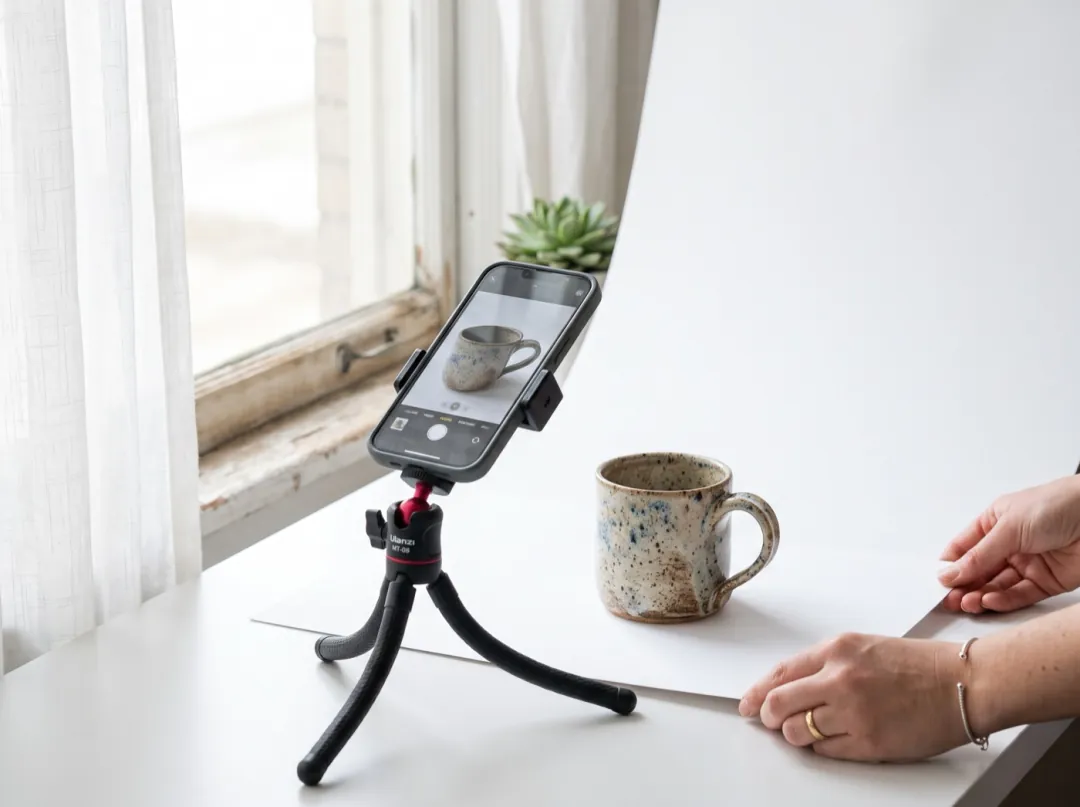
Light. A window to one side gives soft, even light with a gentle shadow that tells the eye the product has shape. Direct sun is too harsh: it makes hot spots on glossy surfaces, and those spots can crawl across the product as the camera moves. If the sun comes in, hang a thin white sheet or baking paper over the window.
Background. A sheet of white or light grey card curved up behind the product, so there is no line where the table meets the wall. Plain backgrounds animate cleanly; patterns and clutter give the model things to move that you did not ask for. If you already have a photo with a messy background, swap it with the background remover before animating.
Angle. Shoot at the height of the product, straight on or a little above, the way a shopper would see it on a shelf. A steep top-down shot leaves the model guessing the sides when the camera moves.
- Use a tripod or a stack of books. A sharp photo matters more than an expensive camera.
- Turn the label toward the camera. The model keeps text it can read; it invents text it cannot.
- Leave a margin. About a third of the frame empty around the product gives a push-in or orbit room.
- Wipe the product. Dust and fingerprints show up, and stay, in every frame.
- Shoot the shape you will post. Tall for Reels and Stories, square for the feed.
Motions that sell
Product clips work when the product stays still and solid and something small around it moves. The camera move gives the clip life; the detail gives it a reason to watch. For the mug, we asked for steam, a push-in and light moving across the glaze:
Steam rises, the camera pushes in slowly and light slides across the glaze. One continuous shot, no cuts, natural physics, stable faces and hands. Keep the first frame’s faces, clothes and light.
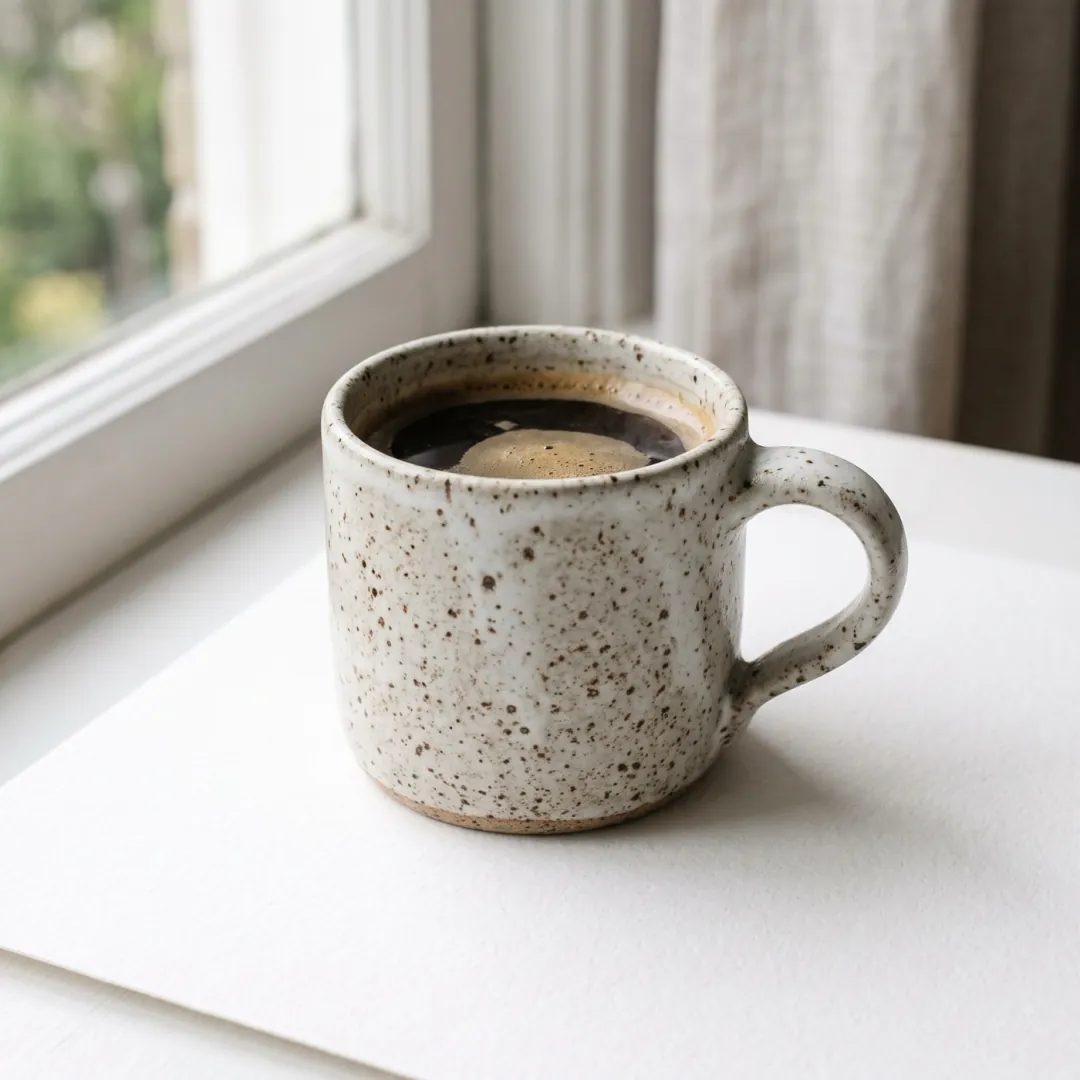
The push-in came out clean, and the mug stayed the same mug, which is the part that matters for an ad. The steam is the weak point: at 480p it is too faint to read. When a detail like that is the point of the clip, rerun at a larger size or make it the first words of the prompt.
| Product | Motion that suits it |
|---|---|
| Drinks and food | Steam rises, condensation runs down the glass, slow push-in. |
| Skincare and bottles | Light slides across the bottle, a drop runs down the side, slow orbit. |
| Shoes and bags | Slow orbit around the product, camera at product height. |
| Jewellery | Light glints across the stone, very slow push-in. |
| Clothes on a hanger | A breeze moves the fabric, camera holds still. |
| Gadgets | The screen lights up, slow pull back to show the whole device. |
Avoid asking the product itself to do things it cannot do, such as a closed box opening or a bottle pouring. The model will invent the inside, and what it invents will not match your real product.
Which model to use
| If you need | Pick | Credits |
|---|---|---|
| Drafts, like the mug above | Seedance 2 Mini | 30 · 480P 5s |
| Smooth camera moves for the final cut | Seedance 2 Fast | 120 · 720P 5s |
| Photo-real light and texture | FLUX 3 | 190 · 720P 5s |
 Seedance 2 Mini
 FLUX 3
Draft the motion on the cheap model first. Once you have the move you want, rerun the same photo and prompt on a stronger model at the size you will publish.
When the product changes
| What you see | Why | What to change |
|---|---|---|
| The label text warps | Small or angled text the model cannot read. | Turn the label to the camera, shoot closer, ask for less camera motion. |
| The shape bends during an orbit | The model had to invent the back of the product. | Use a push-in instead, or shoot from a three-quarter angle. |
| Bright spots crawl across it | Direct sun or a hard light on a glossy surface. | Diffuse the light and shoot again. |
| The detail you asked for is missing | Too faint at a small size, or buried in the prompt. | Put it first in the prompt, or rerun at a larger size. |
FAQ
Can I make a product video from one photo?
Yes. One clean photo on a plain background is enough for a short clip with a camera move and a small detail such as steam or moving light.
What background works best for product clips?
Plain white or light grey card, curved up behind the product. Patterns and clutter give the model things to move that you did not ask for.
Will the model keep my label and logo?
It keeps text it can read clearly. Turn the label toward the camera, shoot close enough that the letters are sharp, and keep the camera move small.
Do I need a professional camera?
No. A phone on a tripod by a window is enough. Steadiness and soft light matter more than the camera.
Can the product open or pour in the video?
We would not ask for it. The model has to invent the inside of the product, and the result rarely matches the real thing.