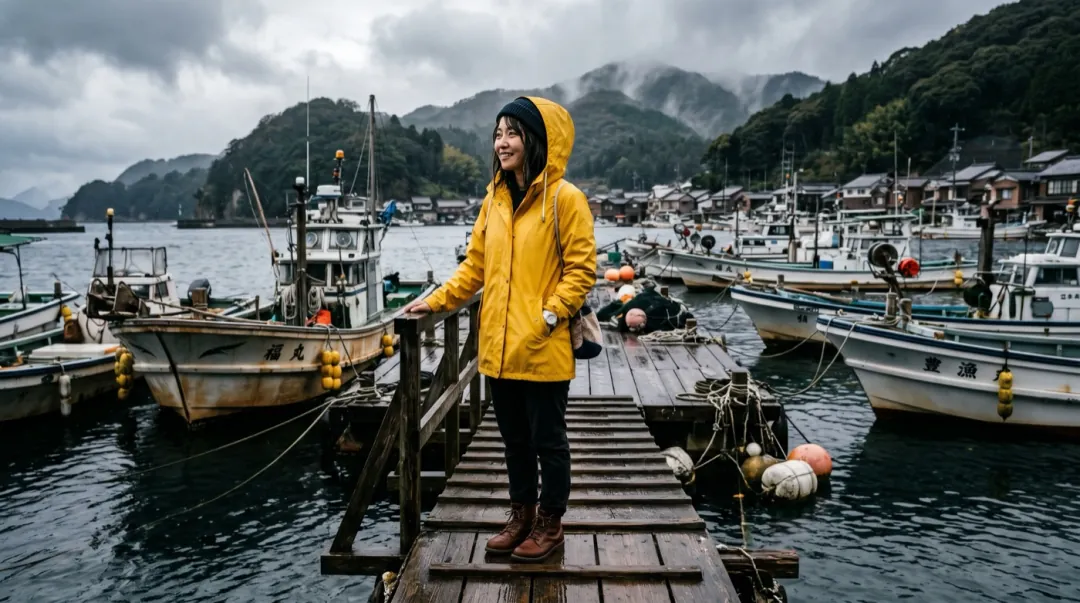
A camera move is the cheapest way to make a still photo feel like footage. The subject barely has to do anything; the camera does the work. We took one photo of a woman in a yellow raincoat on a harbour pier and asked for four different moves, each in a single short line. Same model, same length and size, nothing else changed.
- Name one camera move per clip, in plain film words.
- Dolly and push-in for faces, orbit for depth, crane for places, handheld for a lived-in feel.
- A move needs room: the wider the photo, the more the camera can travel.
- If the subject changes during the move, ask for a smaller move or a slower pace.
One photo, four moves
Dolly in. The camera travels straight toward the subject. In our clip it moves smoothly from her full figure to a head-and-shoulders shot without the framing wobbling. It is the safest move for portraits because the face stays square to the camera the whole time.
Slow dolly in toward her. One continuous shot, no cuts, natural physics, stable faces and hands. Keep the first frame’s faces, clothes and light.
Orbit. The camera arcs around the subject. Ours swings to a closer three-quarter view while the boats behind her shift across the frame, which is what sells the depth. Orbits ask the model to invent the side of the subject it cannot see, so they work best when the photo already shows a little of the side.
The camera orbits around her, boats slide past behind. One continuous shot, no cuts, natural physics, stable faces and hands. Keep the first frame’s faces, clothes and light.
Crane up. The camera rises and pulls back. She becomes small and the whole harbour fills the frame. Use it to open or close a sequence, or when the place matters more than the person. The model has to invent everything that was outside the original frame, so expect the far edges to be the least faithful part.
The camera cranes up from the pier to show the whole harbour. One continuous shot, no cuts, natural physics, stable faces and hands. Keep the first frame’s faces, clothes and light.
Handheld. The camera walks toward her with a slight shake, the way a phone would. In our clip she also turned to the camera and smiled, which we did not ask for: handheld reads as someone filming her, and the model filled in a reaction. If you want her to stay still, say so.
Handheld walk toward her with natural shake. One continuous shot, no cuts, natural physics, stable faces and hands. Keep the first frame’s faces, clothes and light.
Words that get each move
Video models learned camera moves from film and video captions, so the plain terms work better than descriptions. These are the words we use, with what each one asks for:
| Move | Words to use | Good for |
|---|---|---|
| Push-in / dolly in | slow push-in · dolly in toward her | Portraits, products, a reveal of detail |
| Pull-out / dolly out | slow pull back · dolly out | Endings, showing where the subject is |
| Pan | pan left · slow pan across the room | Rooms, landscapes, wide group photos |
| Orbit | the camera orbits around her · arc to the right | People and products with space behind |
| Crane / rise | the camera cranes up · rises to show the street | Places, houses, openings |
| Handheld | handheld walk toward her · natural shake | Vlogs, UGC, a candid feel |
| Static | camera holds still · locked-off shot | When only the subject should move |
We made all four clips on Seedance 2 Mini. The same words work on the other models here, but how closely each one follows them varies, and some add a little drift of their own. Draft the move at 480p first; once it is right, rerun the same line on the model you want for the final clip.
Picking the move for your photo
- Tight portrait? Push-in or static. There is no room to orbit or crane.
- Wide photo with a clear background? Orbit or pan, so the background can move against the subject.
- The place is the point? Crane up or pull out.
- Meant to look filmed on a phone? Handheld, at a calm pace.
- People in the photo who should not change? Pick the smallest move that tells the story.
You can combine a camera move with a subject action, as in "she turns and smiles, slow push-in". Keep it to one of each. Two camera moves in five seconds usually comes out as neither.
When the move goes wrong
| What you see | Why | What to change |
|---|---|---|
| The camera does not move | The move was buried in a long prompt. | Put the camera words first, or make them the whole prompt. |
| The face changes during an orbit | The model had to invent the side of the face. | Use a photo that shows a three-quarter view, or switch to a push-in. |
| Warped edges after a crane or pull-out | Everything outside the photo is invented. | Start from a wider photo, or extend it first with the image extender. |
| Shake looks like a glitch | Handheld at a fast pace. | Add "slow" and "natural shake", or use a dolly instead. |
Open the orbit example below with the harbour photo and the exact line filled in, then swap in your own photo.
FAQ
What camera movements can AI video do from a photo?
Push-in and pull-out (dolly), pan, orbit, crane up or down, handheld and a locked-off static shot all work from a single photo. Name one move per clip in plain film words.
Which camera move is safest for faces?
A slow push-in. The face stays square to the camera, so the model does not have to invent a side view. Orbits are the riskiest for faces.
Can I combine a camera move with the subject moving?
Yes, one of each works well, for example "she turns and smiles, slow push-in". Two camera moves in one short clip usually come out muddled.
Why did the camera move when I did not ask for it?
With no camera words, the model chooses a move itself. Add "camera holds still" if only the subject should move.
Do all models follow camera prompts the same way?
The same words work across models, but how closely each one follows them varies. Draft the move on a low-cost model at 480p, then rerun it on the model you want.