An image to video prompt does a different job from an image prompt. The picture already exists; the words only have to say what changes. That makes a good motion prompt much shorter than people expect, and the most common mistakes are writing too little or far too much. To show the difference, we gave one photo three prompts and kept every result, good and bad.
- Describe the motion, not the photo. The model can already see the photo.
- One or two actions fit in five seconds. Five or six do not.
- A prompt has four parts: who moves, the camera, what else moves, and pace.
- If the result is off, change one part and run again.
Same photo, three prompts
The photo: a boy of about ten and a scruffy terrier on a porch step. Same model, same length and size for all three runs. Only the words changed.
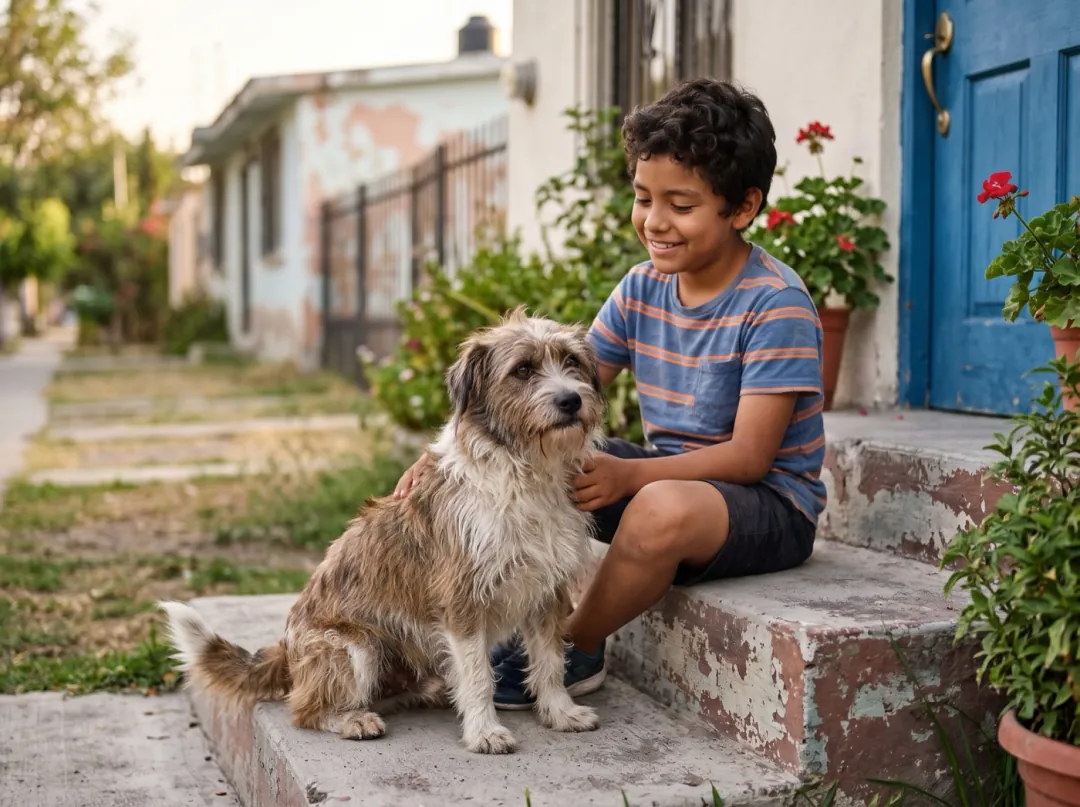
Prompt 1, too vague. We wrote only "Make it move." The model had nothing to aim at, so it did the safest thing it could: a slight push-in, the boy pets the dog, and the scene otherwise stays still. Nothing is broken, but nothing happens either. This is what most people get on their first try and why they decide the tool "does not do much".
Prompt 2, clear and short. One action from the boy, one from the dog that follows from it, one camera move:
The boy throws a ball across the yard, the terrier sprints after it and brings it back, slow push-in. One continuous shot, no cuts, natural physics, stable faces and hands. Keep the first frame’s faces, clothes and light.
Prompt 3, too much. We asked for a throw, a chase, a passing car, rain, a rainbow, a spinning camera, birds and a backflip, all in five seconds. The model tried to fit everything and lost the photo doing it.
The boy throws a ball, the dog chases it, a car drives by, it starts raining, a rainbow appears, the camera spins and zooms, birds fly, he does a backflip. One continuous shot, no cuts, natural physics, stable faces and hands. Keep the first frame’s faces, clothes and light.
Notice what happened to the extra events. They did not simply get skipped; the model blended some (the car and the rainbow became one painted car) and cut away from the original scene to fit the rest. Past two or three events, you are no longer animating your photo, you are asking for a new video that happens to start from it.
The four parts of a motion prompt
Every prompt that worked for us had the same shape. You rarely need all four parts, but knowing them tells you what to add when a result is missing something.
| Part | What it says | Examples |
|---|---|---|
| Who moves | One subject and one action, in plain verbs. | she turns and smiles · the cat blinks · he lifts the cup |
| Camera | One move, or "holds still". Leave it out and the model picks. | slow push-in · pan left · orbit around her · camera holds still |
| What else moves | Small things around the subject that make the scene feel alive. | hair in the wind · steam rises · leaves drift · lights flicker |
| Pace | How fast. Most models default to a medium pace. | slowly · calm · quick and playful · slow motion |
The colours in the prompt boxes on this page mark those parts: the clear prompt has an action, a camera move and a follow-on action. The vague one has nothing to colour.
A few habits that held up across every model we tried:
- Use verbs, not adjectives. "She laughs and tilts her head" beats "a joyful, beautiful moment".
- Skip what is already in the photo. No need for "a boy in a red shirt on a porch".
- Say what should stay. "Keep the first frame’s faces, clothes and light" helps faces hold.
- Ask for one shot. "One continuous shot, no cuts" stops models from jumping to a new angle.
- Name speech and sound only on models that make sound. On silent models those words do nothing.
Prompts by use
Starting points we have tested on this site. Swap the subject for yours and keep the shape.
| Use | Prompt shape | Guide |
|---|---|---|
| Portrait | She turns toward the camera and smiles, hair moves slightly, slow push-in. | Basics |
| Old family photo | The grandmother laughs, the children wave, a breeze moves the plants. | Old photos |
| Pet | The cat’s jaw chatters at the birds, its tail twitches. | Pet photos |
| Product | Steam rises, the camera pushes in slowly, light slides across the glaze. | Product photos |
| Room or listing | Slow push-in toward the island, light shifts gently. | Real estate |
| Camera only | The camera cranes up from the pier to show the whole harbour. | Camera moves |
Each of these has its own guide with the photo, the clip and the settings: old photos, pets, products, listings and camera moves.
Reading a bad result
| What you see | Why | What to change |
|---|---|---|
| Barely any motion | No action named. | Add one verb for the subject and one camera move. |
| Cuts, new scenes, lost framing | Too many events for the length. | Keep two actions at most; add "one continuous shot, no cuts". |
| Things merge or morph | Two requested objects competing for the same space. | Remove one of them, or give them separate places in the frame. |
| Motion too fast or jittery | No pace given, or a fast camera move. | Add "slowly" or "calm", or ask for "camera holds still". |
Try the clear prompt on your own photo. The button opens the generator with the porch photo, the prompt and the model already set; change the subject and the action to fit your picture.
FAQ
How long should an image to video prompt be?
One or two sentences. Name one or two actions, a camera move if you want one, and anything that should stay the same. Longer prompts with many events tend to turn into cuts.
Should I describe what is in the photo?
No. The model already sees the photo. Spend the words on what changes: who moves, how the camera moves and how fast.
Why does my clip barely move?
A vague prompt such as "make it move" gives the model nothing to aim at, so it makes a small, safe motion. Name a clear action, for example "the boy throws a ball and the dog runs after it".
Why did my clip turn into a different scene?
Too many events for a five-second clip. The model blends or cuts to fit them in. Keep it to one or two actions and add "one continuous shot, no cuts".
Do the same prompts work on every model?
The same shape works everywhere. Sound words like speech or ambience only matter on models that make sound, and some models follow camera moves more closely than others.